Rocket League Sideswipe
Screenshots
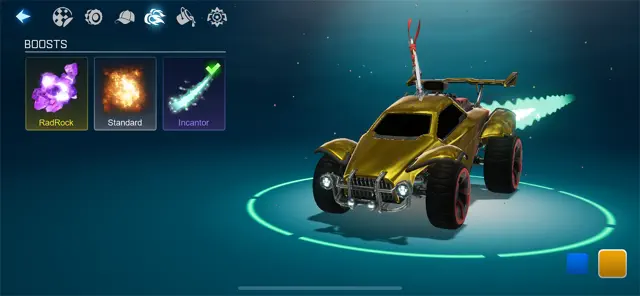
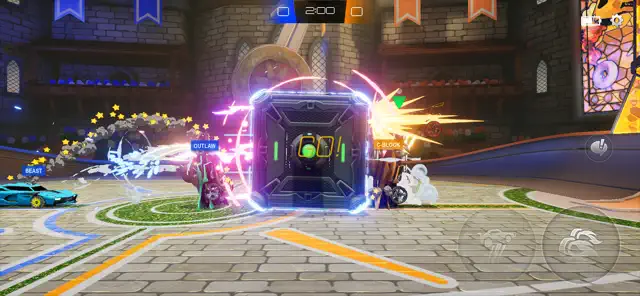
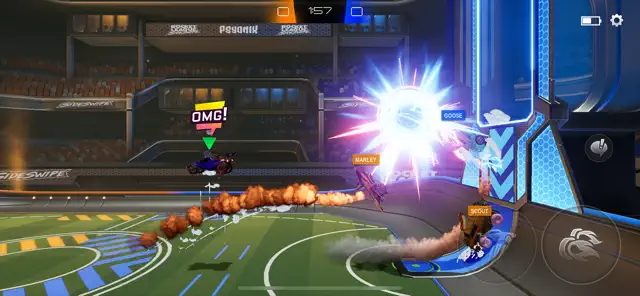
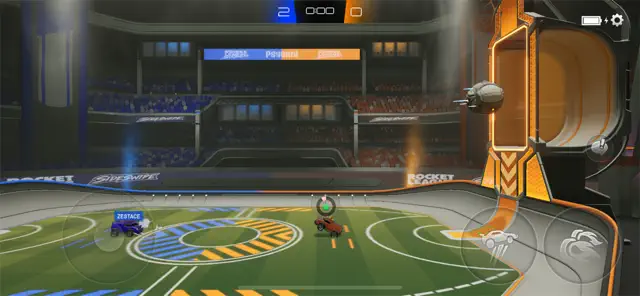
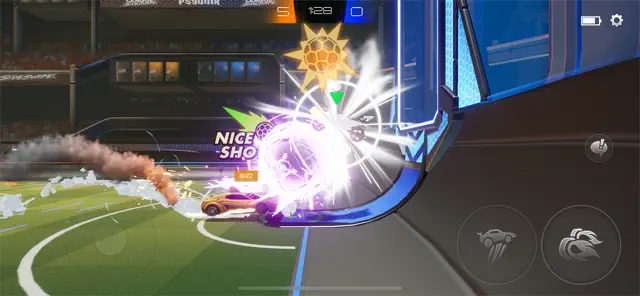
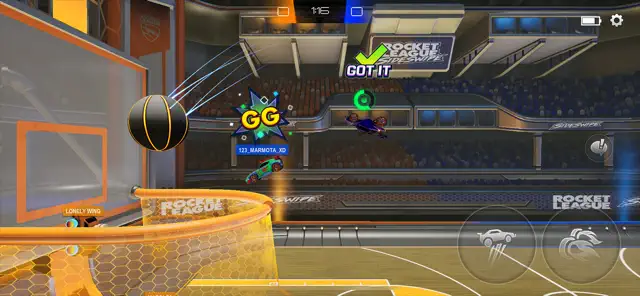
Rocket League Sideswipe offers a fresh take on the classic car-soccer formula. Psyonix reimagined the high-octane gameplay specifically for mobile devices. You compete in fast-paced matches that last only two minutes. This makes the game perfect for quick breaks or gaming on the go.
The Android version features intuitive touch controls that anyone can master. You drive on a 2D plane, which simplifies the movement without losing the competitive edge. Whether you are a veteran of the original game or a complete newcomer, the experience feels responsive and rewarding.
How to Download and Install Rocket League Sideswipe APK for Android
Rocket League Sideswipe offers the fast-paced action of car soccer in a 2D perspective designed specifically for mobile devices. If you cannot access the game through official stores, manual installation is a great alternative.
Follow this guide to get the game running on your Android device quickly and safely.
Check Your Device Requirements
Before you begin the download, ensure your phone can run the game smoothly. A compatible device prevents lag and crashes during intense matches.
- Operating System: Your phone needs Android 7.0 or higher.
- System Architecture: You must have a 64-bit operating system.
- Memory: At least 2GB of RAM is required.
- Storage Space: Keep at least 2GB of internal storage free for the game and updates.
Prepare Your Device for Installation
Android devices restrict apps from unknown sources by default. You must change this setting before you can install an APK file.
- Open your Settings menu.
- Navigate to Security or Privacy.
- Find the option labeled Install Unknown Apps.
- Select your preferred mobile browser (like Chrome).
- Toggle the switch to Allow from this source.
Step 1: Download the Rocket League Sideswipe APK
First, you need to download the APK file. Look for a version that matches your device’s architecture.
- Visit Filetomob.com.
- Search for “Rocket League Sideswipe APK Download”.
- Navigate to the game page.
- Click the download APK button.
- Wait for the file to save to your Downloads folder.
- Verify that the file ends in .apk.
Step 2: Install the Game
Once the download finishes, you can start the installation process.
- Open your File Manager app.
- Locate the Downloads folder.
- Tap on the Rocket League Sideswipe file.
- Confirm the installation by tapping Install.
- Wait for the progress bar to reach the end.
Step 3: Launch and Update
After the installation finishes, the game icon appears on your home screen. Tap the icon to start the game.
The app often requires an additional data download when you first open it. Ensure you have a stable Wi-Fi connection to avoid data charges. Sign in with your account to save your progress and unlock rewards.
Helpful Tips for Better Performance
Rocket League Sideswipe runs best on modern hardware. If you experience lag, try these adjustments:
- Close Background Apps: Free up RAM by closing other programs.
- Check Storage: Ensure you have at least 2GB of free space.
- Adjust Graphics: Lower the visual settings in the game menu to increase your frame rate.
- Update Android: Keep your operating system current to ensure compatibility.
You are now ready to hit the pitch and score some goals. Enjoy the high-speed competition of Rocket League Sideswipe on your Android phone!
Rocket League Sideswipe for Android: Gameplay
Rocket League Sideswipe reimagines vehicular soccer for your phone. It keeps the high-octane energy of the original game but adapts the physics for a handheld experience. Whether you are a veteran pilot or a new driver, this mobile version offers a fresh way to compete.
The 2D Perspective: A New Dimension of Strategy
The most striking change in Sideswipe is the shift from a 3D world to a 2D side-scrolling arena. You no longer worry about 360-degree positioning. Instead, the camera stays fixed on the side of the pitch.
This change transforms how you approach every match:
- Focus on Verticality: Since you move on a flat plane, the ceiling and floor become your best friends. You must master aerial maneuvers to outplay opponents.
- Precision Timing: Without a third dimension, intercepting the ball depends entirely on your jump timing.
- Predictable Rebounds: The 2D walls create consistent bounce patterns. Smart players learn to use these angles to pass to themselves.
Core Mechanics: Built for Touch
The developers rebuilt the engine specifically for mobile devices. You do not need to tilt your phone or struggle with complex steering wheels.
Intuitive Controls
The interface features a clean, responsive layout:
- Digital Joystick: Located on the left side of your screen. It handles your direction and pitch in the air.
- Jump Button: A simple tap launches your car. Double-tap to perform a dodge or a flip.
- Boost Button: Hold this to accelerate instantly. It is essential for reaching high balls or recovery.
- Simplified Physics: The game assists with orientation, so you spend less time crashing and more time scoring.
The 2-Minute Rule
Every match lasts exactly two minutes. This short duration serves several purposes:
- Portability: You can finish a full competitive game while waiting for a bus or during a quick break.
- High Intensity: Because the clock is short, every goal feels massive. There is no downtime.
- Quick Progression: You can play dozens of matches in an hour, allowing for rapid skill improvement and rank climbing.
Game Modes Overview
Sideswipe offers various ways to play, whether you want to climb the ranks or just relax.
Competitive and Casual Play
- Soccar: This is the classic mode. You can jump into 1v1 duels for a test of pure skill or 2v2 matches for team-based strategy.
- Hoops: In this basketball-inspired mode, the goals sit horizontally off the ground. You must lob the ball upward to score, which requires excellent aerial control.
- Heatseeker: Recently added to the Ranked rotation, this mode adds a homing effect to the ball. Once you hit it, the ball automatically zips toward the opponent’s goal. It turns the game into a high-speed version of “Pong.”
Offline Training
If your internet is unstable or you want to warm up, use the offline features:
- Freeplay: An open arena with infinite boost. Use this space to practice “flip resets” and “gold shots.”
- Exhibition: Set up a match against AI bots. You can choose the difficulty level to test your defensive rotations before heading into a real lobby.
Master the Arena: Rocket League Sideswipe Progression and Style
Rocket League Sideswipe delivers high-octane competitive action to your mobile device. While the physics-based gameplay keeps you on your toes, the progression system keeps you coming back for more. Every match you play contributes to your legacy.
The Rocket Pass: Your Path to Glory
The Rocket Pass serves as the heartbeat of every new season. This battle pass system rewards your dedication with a steady stream of fresh loot.
- Earn XP: You gain Experience Points (XP) by completing matches and finishing daily or weekly challenges.
- Tier Up: As your XP grows, you climb through various tiers. Each tier unlocks a specific reward.
- Exclusive Loot: The pass features unique car bodies, vibrant decals, stylish wheels, and dramatic Goal Explosions.
- Seasonal Resets: Every season introduces a brand-new pass. This ensures the rewards stay fresh and the grind remains exciting.
Active players progress quickly. Simply playing the game allows you to deck out your collection without extra effort.
The Garage: Express Your Identity
Your Garage is the creative hub of the game. Here, you transform a basic vehicle into a personal masterpiece. The game offers thousands of possible cosmetic combinations to ensure your car stands out on the pitch.
Iconic Car Bodies
You can choose from fan-favorite vehicles familiar to any veteran of the franchise:
- Octane: The versatile classic loved by pros.
- Dominus: A sleek, powerful choice for stylish hits.
- Merc: A heavy hitter with a massive presence.
Limitless Customization
Beyond the car itself, you can modify almost every visual aspect:
- Decals: Apply intricate patterns and bold stripes.
- Paint Finishes: Choose between matte, metallic, or glossy textures.
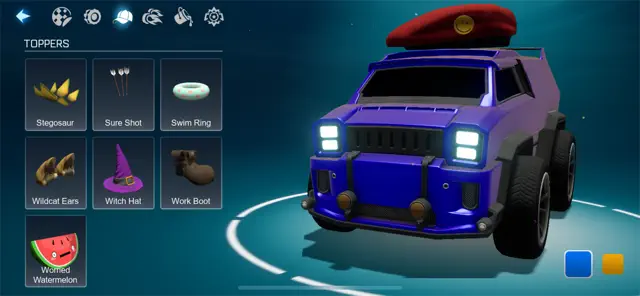
- Toppers & Antennas: Add a touch of humor or flair to your roof.
- Boost Trails: Leave a shimmering path of light as you soar through the air.
Pure Skill: No Pay-to-Win Mechanics
One core principle defines the Sideswipe experience: fairness. While the customization options are vast, they never impact the physics of the game.
- Purely Cosmetic: A rare decal or a premium car body does not make you faster. It does not make your hits stronger.
- Skill-Based Victory: Success depends entirely on your timing, positioning, and aerial control.
- Level Playing Field: A new player and a veteran start every match with the same mechanical advantages.
You cannot purchase a win in this arena. You must practice your flip resets and master your defense to climb the competitive ranks. Your mechanical talent remains your greatest asset.
Rocket League Sideswipe: The Competitive Landscape
League Sideswipe delivers high-speed soccer action to your Android device. While the casual matches are fun, the Ranked System provides the ultimate competitive challenge. Players test their skills against others to climb the global leaderboard.
The Grind: Navigating the Ranked Tiers
The journey to the top is a long climb. You start at the bottom and prove your worth through victories. Each win earns you progress toward the next division. Conversely, losses can set you back.
The competitive ladder follows a specific hierarchy:
- Unranked: Your starting point where you find your footing.
- Bronze: The first step into the competitive scene.
- Silver: Where players begin to master basic aerials.
- Gold: A tier defined by increased speed and better defense.
- Platinum: Tactical play and consistent shots become vital here.
- Diamond: High-level mechanics meet fast-paced decision-making.
- Champion: Only the elite players reach this prestigious level.
- Grand Champion: The pinnacle of skill and the highest honor in the game.
Seasonal Play and Exclusive Rewards
League Sideswipe operates on a structured schedule. Each competitive season lasts approximately 55 days. This timeframe keeps the meta fresh and gives players a clear goal to work toward.
When a season ends, your hard work pays off. The game grants rewards based on the highest rank you achieved during that period. Even if you lose your rank right before the season ends, you still earn the rewards for your peak performance.
Typical seasonal rewards include:
- Exclusive Titles: Display your rank next to your name.
- Unique Quick Chat Stickers: Show off your achievements in style.
- Special Cosmetics: Customize your car with rare items that prove your skill.
Seamless Progress with Cross-Progression
Switching phones or playing on a tablet should never mean losing your hard-earned ranks. League Sideswipe uses a robust Cross-Progression system.
To keep your data safe, you must link your Epic Games account. Once linked, your rank, items, and seasonal progress follow you to any Android device. This feature ensures you can continue your grind anywhere at any time.
Tips for Climbing the Ranks
Climbing requires more than just fast thumbs. Success in the higher tiers depends on strategy and patience.
- Master the Flip Reset: Learn how to regain your jump by touching the ball.
- Manage Your Boost: Never let your tank run dry during a defensive play.
- Play the Walls: Use the ceiling and sides of the arena to bypass defenders.
- Stay Positive: A calm mind makes better decisions during intense overtime matches.
By understanding the ranked landscape, you transform from a casual player into a true competitor. Start your climb today and claim your spot among the Grand Champions.
Rocket League Sideswipe: Tips & Tricks for Beginners
Rocket League Sideswipe offers a fast-paced twist on the classic car-soccer formula. While the 2.5D perspective simplifies the movement, the skill ceiling remains incredibly high. If you want to climb the ranks quickly, you must master the fundamental mechanics of the pitch.
Follow these essential tips and tricks to dominate your early matches.
Master the Infinite Double Jump
In Sideswipe, your “flip” or second jump is your most powerful offensive tool. Unlike the original game, you can regain this jump without touching the ground.
- The Reset Rule: Your jump resets every time your wheels touch a flat surface or the ball itself.
- The “Flip” Shot: Use your second jump right as you impact the ball. This creates a purple or gold shot that travels much faster than a standard hit.
- Ceiling Play: Use the ceiling to reset your flip. Dropping from the top of the arena with a fresh jump gives you a massive advantage over defenders.
Elevate Your Aerial Game
You cannot win matches by staying on the ground. Since the goals are elevated, air control determines who controls the tempo.
- Manage Your Boost: Never hold the boost button continuously. Use short bursts to maintain altitude and save energy for critical saves.
- The Joystick Flick: Point your joystick in the opposite direction of your momentum for quick mid-air turns.
- Fast Aerials: Jump and boost simultaneously to reach high-flying balls before your opponent. Practice this in the “Free Play” mode to build muscle memory.
Prioritize Defensive Rotation
Many beginners make the mistake of “ball chasing.” They follow the ball everywhere and leave their goal wide open. Effective defense wins more games than flashy goals.
- Shadow Defending: Stay between the ball and your goal. Do not dive into a challenge if you are the last person back.
- The Heatseeker Strategy: In Heatseeker mode, the ball automatically tracks toward the goal. Position yourself inside the net and wait for the ball to come to you rather than chasing it mid-pitch.
- Rotate Out: After you take a shot, immediately head back toward your own half. This allows your teammate to move forward while you cover the rear.
Use Controlled Power Shots
Randomly hitting the ball often passes it straight to the enemy. Instead, focus on the “nose” of your car for maximum impact.
- Red Shots: Hit the ball with the front bumper of your car while boosting to execute a standard power shot.
- Gold Shots: Flip away from the ball while the back of your car touches it. This creates a high-velocity defensive clear that can catch opponents off guard.
- Purple Shots: If all four wheels touch the ball and you jump, the ball blasts away with incredible force. Use this to clear the ball across the entire map.
By practicing these maneuvers, you turn your vehicle into a precision instrument. Focus on positioning first, and the goals will follow naturally.
Mastering Rocket League Sideswipe: The “Pro” Moves
Rocket League Sideswipe takes the classic car-soccer formula and shrinks it into a fast-paced 2D challenge. To climb the ranks on Android, you must move beyond basic driving. You need the “secret sauce” that separates casual players from the elites.
The “Claw” Grip: Why Three Fingers Beat Two Thumbs
Most beginners start by using their two thumbs. While comfortable, this setup limits your speed. To master advanced aerials, you should switch to the Claw Grip.
- Extra Input: You use three fingers instead of two.
- Independent Aiming: One thumb manages movement and aiming.
- Dedicated Boosting: Your index finger stays on the boost button.
- Faster Flips: Your second thumb handles the jump and flip mechanics.
The Claw Grip allows you to boost and jump at the exact same time without lifting a finger. This split-second advantage helps you win more 50/50 challenges in the air.
Special Shots: Adding Color to Your Game
Standard hits often lack the power needed to score against high-level defenders. Master these three “colored” shots to keep your opponents guessing.
1. The Red Shot (Power Shot)
You execute a Red Shot by front-flipping directly into the ball.
- The Technique: Point your nose at the ball and trigger your dodge.
- The Result: Your car glows red, and the ball blasts forward with maximum velocity.
- Best For: Scoring from midfield or overpowering a goalie.
2. The Gold Shot (The High Clear)
The Gold Shot uses the rear of your car to create a massive defensive arc.
- The Technique: Face away from the ball and dodge backward as your tail makes contact.
- The Result: Your car glows gold, launching the ball high into the air.
- Best For: Clearing the ball out of your corner or lobbing it over an over-extended opponent.
3. The Purple Shot (The Flick)
This move uses the underside of your car to create height and distance without using a flip.
- The Technique: Jump so your wheels face the ball, then release all directional inputs and tap the jump button.
- The Result: Your car glows purple and “pops” the ball away from your chassis.
- Best For: Creating space when you are out of boost or setting up a high-altitude pass.
Advanced Tactics for the Arena
Mechanical skill is only half the battle. You must also play smarter to control the flow of the match.
Boost Management
Never let your boost meter hit zero.
- Feathering: Instead of holding the button, tap it in short bursts to maintain height.
- Ground Recovery: Stay on the ground or the ceiling to refill your meter quickly.
- Efficiency: Only use boost to reach the ball first or to make a save.
Flip Resets
In Sideswipe, you get your flip back when all four wheels touch a flat surface.
- The Strategy: Land all four wheels on the ball mid-air.
- The Benefit: This “resets” your dodge timer. You can then flip again instantly to surprise the defender with a second hit.
“Pancaking” the Ball
Pancaking involves pinning the ball against the ceiling or the wall.
- How it Works: Use the flat roof of your car to trap the ball against a hard surface.
- Why it Works: It kills the ball’s momentum. This allows you to drop with the ball and choose a new angle for a shot while the defender is stuck in the air.
By combining the Claw Grip with these specialized shots and tactical resets, you turn your car into a versatile weapon. Practice these moves in the tutorial mode until they become second nature.
Optimize Rocket League Sideswipe for Android: Pro Performance Tips
Optimizing Rocket League Sideswipe on your Android device makes a massive difference. You can climb the ranks faster when your game runs smoothly. High performance also helps your battery last through long gaming sessions.
Follow these tips to turn your phone into a competitive gaming machine.
Master Your Graphics Settings
Many players think “Ultra” graphics are the best choice. However, top-tier competitive players usually choose “Low” or “Medium” settings.
Why Low Graphics Win
- Higher Frame Rates: Lowering the quality increases your Frames Per Second (FPS). Smoother movement allows you to react faster to the ball.
- Reduced Input Lag: Your phone processes simpler images more quickly. This means your car moves the exact moment you touch the screen.
- Consistent Performance: High graphics cause your phone to heat up. When a phone gets too hot, it slows down the processor to cool off. This leads to sudden stutters during a match.
Adjusting Your FPS Cap
Navigate to the settings menu and look for the Max FPS toggle.
- Select 60 FPS if your device supports it.
- If your phone feels hot or the battery drains too fast, drop it to 30 FPS.
- Higher FPS offers a smoother look, but it demands more power from your hardware.
Secure a Stable Connection
In Sideswipe, even a split-second of lag can cost you a goal. The “red triangle” icon is every player’s worst enemy. It signals a poor connection to the server.
Tips for Better Connectivity
- Prioritize Wi-Fi: Play on a 5GHz Wi-Fi band whenever possible. This frequency provides faster data speeds and less interference than 2.4GHz.
- Stay Close to the Router: Physical walls block signals. Sit in the same room as your router to keep your “ping” low.
- Disable Background Apps: Apps like social media or cloud backups use bandwidth in the background. Close these apps before you start a match.
- Turn Off Bluetooth: Sometimes, Bluetooth signals interfere with Wi-Fi on older Android devices. Try turning it off to see if your stability improves.
Extend Your Battery Life
Gaming consumes a lot of energy. You can enjoy more matches by managing how your phone uses power.
Power Management Steps
- Lower Screen Brightness: The display is the biggest battery drain. Keep it at a comfortable level, but avoid 100% brightness.
- Turn Off Haptics: Vibration motors use extra energy. Disable “Vibration” in the game settings to save power.
- Use Game Mode: Most Android phones have a built-in “Game Space” or “Game Turbo.” Enable this feature to optimize system resources for the game.
- Avoid Charging While Playing: Charging creates heat. Combining charging heat with gaming heat can damage your battery over time.
By following these steps, you ensure your device stays cool and your connection stays fast. Focus on performance first, and the wins will follow.
Rocket League Sideswipe Meta: Top Cars and Hitboxes
In Rocket League Sideswipe, victory depends on precision. While the developers keep the physics engine balanced, your choice of car dictates how you interact with the ball. High-level players know that “feel” is everything.
Understanding the Hitbox Secret
Unlike the PC and console versions of Rocket League, Sideswipe uses a more unified hitbox system. This ensures that no single car has a massive mechanical advantage. However, the visual model of the car still dictates your timing.
- Visual Alignment: The closer a car’s skin matches its invisible hitbox, the easier it is to aim.
- Length and Leverage: Longer cars provide more surface area for specific trick shots.
- Height and Defense: Taller cars help players visualize blocks during intense goal-line scrambles.
Transitioning between cars can change how you time your flips. Because of this, choosing a “main” vehicle is vital for muscle memory.
The Big Three: Meta Tier List
Professional players gravitate toward three specific body types. Each offers a distinct psychological and visual edge on the pitch.
1. The Octane: The Balanced Legend
The Octane remains the gold standard for a reason. It is the most reliable vehicle in the game because its visual model perfectly fits its physical hitbox.
- Best For: Beginners and pros alike.
- The Edge: It provides the most honest feedback during aerials.
- Why Use It: You rarely experience “ghost hits” where the ball passes through the corner of your car.
2. The Dominus: The Freestyle Specialist
If you love technical maneuvers, the Dominus is your best bet. Its long, flat hood acts like a paddle.
- Best For: Executing “Purple Shots” and “Gold Shots.”
- The Edge: The increased length makes it easier to find the “sweet spot” for powerful flick shots.
- Why Use It: It offers a massive surface area for catching and carrying the ball during ceiling pinches.
3. The Merc: The Defensive Wall
The Merc feels like a literal brick wall. Its boxy, upright design appeals to players who prioritize defense and heavy hits.
- Best For: Goalkeepers and power hitters.
- The Edge: Its height makes it feel more intimidating during 50/50 challenges.
- Why Use It: The flat front end simplifies the timing for “Red Power Shots.”
Visual vs. Physical Mechanics
You might wonder why cars feel different if the hitboxes are nearly identical. The answer lies in spatial awareness.
First, consider the pivot point. Every car rotates around a center axis. A longer car like the Dominus moves its nose further during a flip than a compact car like the Octane. This affects your reach.
Second, think about surface area. Even if the physics engine treats them similarly, your brain reacts to what it sees. Using a thin car often leads to more “whiffs” if you aren’t used to the narrow visual profile.
How to Choose Your Main
To find your perfect match, test each car in the Freeplay mode. Pay close attention to how the ball reacts when you hit it with the corners of the vehicle.
- Stick to one car to build consistent muscle memory.
- Focus on the Octane if you want a jack-of-all-trades experience.
- Switch to the Dominus if you want to master high-speed flicks.
- Pick the Merc if you want to dominate the ground game.
Ultimately, the meta isn’t just about stats. It is about how much you trust your car when the clock hits zero. Select the vehicle that matches your visual style and start climbing the ranks today.
Rocket League Sideswipe: Monetization
Many players wonder if Rocket League Sideswipe is actually free to play. The short answer is yes. You can enjoy the full competitive experience without spending a single cent. The game uses a “freemium” model where all costs are optional and focus entirely on how your car looks.
What You Get for Free
You do not need to pay to access the core features of the game. The developers keep the playing field level for everyone.
- All Game Modes: You can play Ranked, Casual, Hoops, and Heatseeker for free.
- The Rocket Pass: Every season features a free track. You can earn roughly 30 different items just by playing.
- The Daily Shop: Check the Shop tab regularly to claim free items offered every week.
- Offline Play: You can practice in exhibition matches against AI bots at no cost.
How Monetization Works
If you want to customize your vehicle, you can choose to spend real money. These purchases do not change your car’s speed or power.
Rocket Pass Premium
The Premium Pass usually costs about $10 USD per season. It grants access to over 50 exclusive items, including new car bodies and flashy Goal Explosions.
The Item Shop
The shop rotates its inventory daily and weekly. You can buy specific decals, wheels, or boosts. Prices typically range from $1 to $15 depending on the item’s rarity.
Bundle Packs
Bundles offer a complete look for your car. These pre-made sets include matching decals and boosts. They generally cost between $5 and $10.
What You Cannot Buy (No Pay-to-Win)
Rocket League Sideswipe avoids “pay-to-win” mechanics. You cannot use money to gain a competitive edge over other players.
- Rank Advancement: You must win matches to climb the leaderboard.
- Skill Boosts: No item makes your car move faster or hit harder.
- Extra Boost Meters: Every player starts with the same amount of boost.
- Goal Advantage: You cannot pay to make your opponent’s goal larger or your own smaller.
Smart Spending Tip
If you decide to buy the Rocket Pass Premium, play consistently. If you reach Tier 110, you earn back enough in-game currency to unlock the next season’s pass. This cycle allows you to get every future Premium Pass for a one-time investment.
The Future of Rocket League Sideswipe on Android
Many players worry when a popular game leaves the Google Play Store. You might ask if Rocket League Sideswipe is fading away. The short answer is no. In fact, the game is entering a new era of growth. Moving to the Epic Games Store (EGS) changed how you download the game, but the soul of the competition remains stronger than ever.
Why the Game Stays Strong
Psyonix continues to pour energy into this mobile spin-off. It is not a forgotten project. Instead, it serves as a core part of the Rocket League universe. Here is why the game is thriving:
Constant Development Cycles
- Seasonal Updates: The team releases fresh content every 55 days.
- New Features: Each season introduces unique cars, vibrant arenas, and fresh cosmetics.
- Current Highs: Season 17 recently launched, featuring the fan-favorite Heatseeker mode in ranked play.
- Total Sync: You can still play against friends on iOS. The cross-play systems work perfectly regardless of where you downloaded the app.
A Healthy Competitive Scene
A game dies when the lobbies go quiet. In Sideswipe, the engines are still roaring. The player base remains dense and active across all skill levels.
- Fast Queue Times: You will usually find 1v1 and 2v2 matches in under 15 seconds during peak hours.
- High-Level Play: Even at the Grand Champion rank, matchmaking usually takes less than a minute.
- Fairer Matches: Moving to the Epic Games Store actually helped the community. It made it harder for people to use modded APKs or cheats. This creates a more level playing field for honest players.
What the Community Craves
The developers listen to player feedback to keep the momentum going. Fans have a clear wishlist for the next stage of the game’s evolution. These features could redefine the mobile experience:
- Rumble Mode: Players want the chaotic power-ups from the PC version, like grapples and plungers.
- 3v3 Matches: While 2v2 is the current limit, a chaotic three-player mode would add a new layer of strategy.
- Local Wireless Play: This would allow Android users to compete against each other offline or at events without lag.
The Official Verdict
Epic Games and Psyonix have stated that Sideswipe is a long-term project. It is not a temporary experiment. They provide regular balance patches to keep the cars feeling right. They also perform consistent server maintenance to ensure smooth performance.
By taking control of their own distribution, the developers have more freedom to update the game. If you enjoy high-speed aerial goals on your phone, rest easy. Rocket League Sideswipe is here for the long haul.
Frequently Asked Questions About Rocket League Sideswipe for Android
What exactly is Rocket League Sideswipe?
It is a mobile version of the popular car soccer game. However, the view is different. You play from a 2D side angle. Your car jumps, boosts, and hits a ball into the opponent’s goal. Matches last only two minutes. This makes it perfect for short gaming sessions.
What are the minimum system requirements?
To run the game smoothly on Android, your device should meet these basic specifications:
- Operating System: Android 6.0 (Marshmallow) or newer.
- Memory: At least 2GB of RAM.
- Storage: Approximately 1GB of free space for the initial installation.
How do I log in to save my progress?
You should use an Epic Games Account to log in. This allows you to sync your progress. If you play the original Rocket League on PC or console, linking the same account can earn you extra rewards across both games.
Can I use a controller on Android?
Absolutely. Rocket League Sideswipe supports Bluetooth controllers. Many players find that using a controller provides better precision for aerial maneuvers compared to touch controls.
How do I perform a “Gold Shot”?
The Gold Shot is a powerful defensive and offensive move. To execute it, you must flip your car so the rear bumper hits the ball while you perform a dodge. This move launches the ball with high velocity in the opposite direction.
What are the different game modes?
The game currently offers several ways to play:
- Duel (1v1): A test of pure individual skill.
- Doubles (2v2): The standard competitive mode.
- Hoops: A basketball-inspired mode where you score in a horizontal rim.
- Mutator Madness: A casual mode with randomized physics and rules.
Why is my game lagging?
Lag usually stems from a weak internet connection or background apps. Try these steps to fix it:
- Switch from mobile data to a stable Wi-Fi connection.
- Close all other applications running in the background.
- Lower the “Graphics Quality” in the in-game settings menu.
How do I unlock new cars and items?
You earn items by leveling up your Rocket Pass. You can also use “Tokens” in the Item Shop to purchase specific car bodies, wheels, and goal explosions. Completing seasonal challenges is another great way to expand your garage.
Can I play offline?
You can access the Training and Tutorial modes without an internet connection. However, to play against other people or progress in the Rocket Pass, you must stay online.
How does the ranking system work?
The game features a tiered ranking system. You start at Bronze and work your way up through Silver, Gold, Platinum, Diamond, Champion, and Grand Champion. You gain “pips” for wins and lose them for defeats.
What are the basic controls and mechanics?
Learn these three core actions:
- Jump: Tap the right side of the screen once.
- Flip: Jump again while in the air to dodge or hit the ball.
- Boost: Hold the boost button to move faster.
You also have a handbrake for sharp turns. Practice the tutorial again if you feel stuck.
What are garage items and how do I get them?
Garage items change your car’s look. They include:
- Decals (stickers)
- Wheels
- Boost trails
- Goal explosions
You earn them through leveling up. Also, you get drops from events. Some items appear in the daily shop. None of them change your car’s speed or handling.